A free Roblox mod menu with ready-made presets for the games people actually play — Da Hood, Jailbreak, Blox Fruits, Pet Sim 99 and more. One tap to inject, no keys, no linkvertise, no mystery files. Works on Windows, macOS, Android and iOS from the same account.
Free download, no key system — Windows, macOS, Android and iOS. Rated 4.84/5 by 621 users.
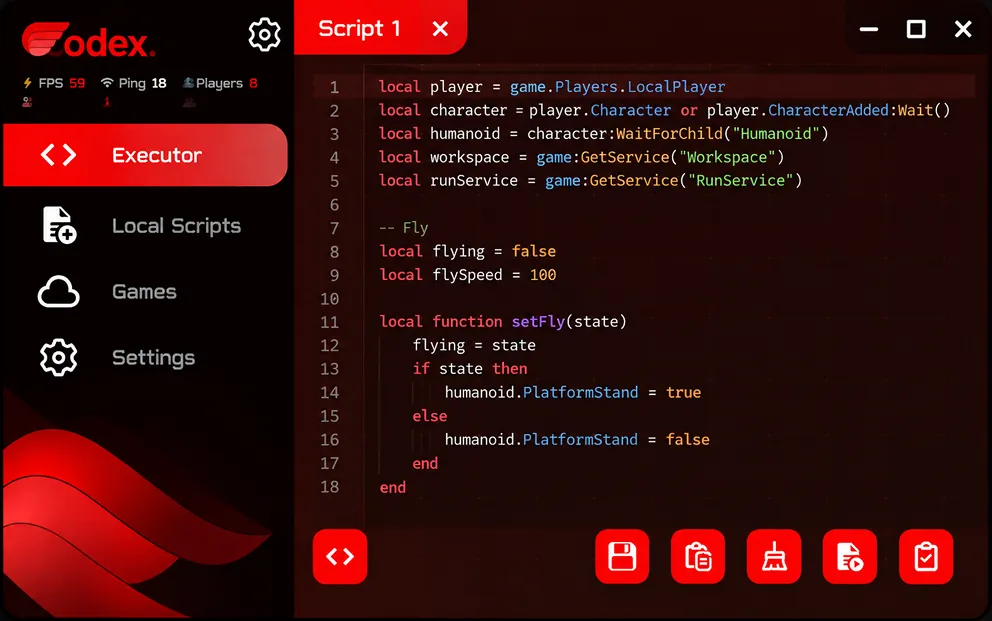
Attached
Da Hood preset active
Codex Executor is a free Roblox script executor — a desktop and mobile app that loads a mod menu into a running Roblox game. Instead of hunting Pastebin links and pasting raw Lua, you open the app, pick your game, and flip toggles: aimbot for Da Hood, auto-rob for Jailbreak, auto-hatch for Pet Sim 99. A full Lua editor is still there for people who write their own scripts.
Under the hood it works like every executor: it attaches to the Roblox process, runs your scripts inside the game, and detaches cleanly when you close it. What's different is the packaging — game presets are built in and tuned per title, there is no daily key system, no Linkvertise maze, and every release ships with a public SHA256 and VirusTotal report. The whole menu sits under 90 MB of RAM, so it runs on phones as well as on gaming PCs.
Codex is built and maintained by developer Dorothy Baldwin together with the Codex Team, and it is rated 4.84 out of 5 by 621 community members across Discord, Trustpilot and in-app feedback.
The current stable build is v2.738 (released October 14, 2026). Ready to grab it? Head to the download page — or keep reading to see whether it's safe, how it stacks up against Delta and Hydrogen, and what real users say.
| Current version | v2.738 |
|---|---|
| Released | October 14, 2026 |
| Platforms | Windows 10/11 (64-bit), macOS 11+, Android 8.0+, iOS 14+ |
| File formats | EXE · DMG · APK · IPA |
| Download size | 46–92 MB (by platform) |
| Price | Free — no key system |
| Game presets | 2,500+ titles, 7 full mod menus |
| Developer | Dorothy Baldwin |
| Community rating | 4.84 / 5 · 621 reviews |
| Download | codexexe.com/download/ |
Most Roblox executors ask you to paste raw code into an editor and hope it works. Codex flips that — the common stuff is already built in as a mod menu, and the editor is there for when you want to run your own Lua.
Pick a game, flip the switches you want — aim, speed, wallhack, auto-farm — and press start. No pasting Lua, no searching Pastebin. Settings save per account so your Da Hood setup stays separate from your Jailbreak one.
When Roblox pushes a Byfron update, the loader fetches a fresh signature and reattaches on its own. You open the app, it just works.
Da Hood, Jailbreak, Bedwars, Arsenal, MM2 — each one gets its own tuned preset so you're not guessing which toggle does what.
Download, install, open — that's it. No daily key, no Linkvertise maze, no popup ads blocking the inject button.
Bind any toggle to a key you pick. Turn aimbot on with V, trigger a saved macro with F — same bindings on PC, same gestures on mobile.
The whole mod menu sits under 90 MB of RAM in the background. Your phone stays cool during long Da Hood sessions and your PC doesn't drop FPS mid-fight. Nothing is pre-loaded that you aren't using.
The honest version — what you get and what still annoys people, straight from the community feedback below.
Short answer: no. The installer on codexexe.com is a clean build with nothing attached — no miner, no stealer, no bundled toolbars. We know antivirus software often flags Roblox mod menus as suspicious, so every release ships with a public VirusTotal link and a SHA256 you can check before running the file.
The warning you see from Defender is a false positive — process injection looks the same whether it's cheating software or a legit debugger. If a build looks off, don't trust re-uploads from Discord servers or YouTube description boxes. Only this domain.
Codex is free, so anyone re-uploading it is doing it for a reason — usually to bolt a stealer onto a known name. Before you run any "Codex" file, check four things:
Pick your device below. The steps are different for each platform — pay attention to the AV / signing bits, that's where most people get stuck.
Every release we've shipped — new game presets, fixes after Roblox updates, UI changes. Click a version to see what moved.
These are the games Codex ships toggles for out of the box — Da Hood, Jailbreak and the rest get full mod menus. Anything not listed still runs through the Lua editor.
Coming from Delta, Hydrogen or Arceus X? Here's the honest side-by-side — including the rows where they beat us.
|
Codex v2.738
This site
|
Delta Executor | Hydrogen | Arceus X | |
|---|---|---|---|---|
| Key system | None — open & play | Daily key + Linkvertise | Key system on mobile | Key system |
| Platforms | Win · macOS · Android · iOS | Android · iOS · Windows | Android · iOS | Android · iOS |
| Built-in game presets | 2,500+ games, 7 full menus | Script hub (~200) | Limited hub | Hub scripts |
| Patch speed after Roblox update | 2–8 hours avg | 1–3 days | Days | Varies |
| macOS build | Native ARM + Intel | — | — | — |
| SHA256 + VirusTotal per release | Yes, every build | Not published | Not published | Not published |
| Community rating | 4.84 / 5 · 621 reviews | ~4.1 / 5 | ~4.0 / 5 | ~3.8 / 5 |
Ratings for alternatives are approximate community figures — your mileage may vary.
First time setup takes about a minute. Here's exactly what happens from opening the app to playing with the mod menu on.
Launch the app before you open Roblox. It needs to be running in the background first.
Open Roblox and join whatever game you want — Da Hood, Jailbreak, anything. Wait until you've loaded in.
Press the big Attach button. It takes about half a second and the status dot flips to green.
The matching preset loads automatically. Turn on what you want — or jump to the Lua tab for custom scripts.
Changes take effect live. Toggle things on and off mid-game without rejoining — the menu stays open or hides to a hotkey.
The usual stuff people run into when installing or attaching. Pick a category on the left or just scroll through the list.
False positive. Every Roblox mod menu gets flagged — Defender sees the injection pattern and assumes the worst. The file matches the SHA256 on our download page, so if the hash lines up, you're good. Add the install folder to the exclusion list and it'll stop warning you.
Open Windows Security → Virus & threat protection.
Click Manage settings under "Virus & threat protection settings".
Scroll to Exclusions → Add a folder → select the Codex install directory.
This is almost always a real-time antivirus scan blocking file writes during the final signature verification step. It's not actually frozen — just waiting on a locked file.
Kill the installer via Task Manager.
Temporarily disable real-time protection for 5 minutes.
Re-run the installer as Administrator. Re-enable protection after install completes.
Codex needs Roblox running and joined into a game — not just at the game list.
Fully close Roblox from the system tray.
Launch Roblox and join a game — wait until you're loaded in.
Return to Codex and hit Attach again.
When Roblox pushes a client update, memory offsets shift and injection breaks temporarily. We patch this within 2–8 hours on average.
Check the System Status widget for update deployment.
Open the app and click Check for updates in settings.
If no patch is out yet, wait — never install "quick fix" builds from unofficial sources.
Usually another script executor or overlay tool is holding the process handle. Only one injection engine can attach at a time.
Close any other executor apps completely.
Disable Discord overlay, MSI Afterburner, and RivaTuner if running.
Restart Roblox and try again from a clean state.
The script is using a legacy function name that's been deprecated. Codex follows the UNC (Unified Naming Convention) standard.
Update the script to use the standard function names, or contact the script author for a UNC-compliant version.
The script's origin URL (usually a Pastebin or Rawscripts link) went offline. This is on the script host's side, not ours.
Try the "Alternative source" button in the hub next to the broken script.
Report the dead link with the flag icon — we'll archive a mirror within hours.
If you've been running scripts for several hours, the script cache can grow. Clearing it takes 5 seconds.
Open Codex → Settings → Advanced.
Click Clear script cache. RAM usage drops immediately.
The IntelliSense engine indexes 5,000+ line files on the main thread by default. Turn on the async indexer for smoother typing.
Settings → Editor → Async indexing → On.
Optional: reduce minimap detail if on a low-end GPU.
The developer certificate isn't trusted yet. iOS blocks any sideloaded app until you approve the signing profile manually.
Open Settings → General → VPN & Device Management.
Tap the developer profile listed under "Enterprise App".
Tap Trust and confirm. The app will launch normally after.
Android 12+ requires explicit permission for apps drawing over other apps.
Settings → Apps → Codex → Display over other apps.
Toggle it on. Relaunch Roblox — the overlay will appear.
Gatekeeper quarantines the download. This one-line Terminal command removes the flag.
No issues in this category yet
Nothing in this category — Codex runs clean here.
What people say after a few weeks of use. Pulled from Discord, Trustpilot and in-app feedback — nothing cherry-picked, warts and all.
Da Hood preset actually tracks heads in combat, not just centers. Been bouncing between other menus for months and this is the first one that doesn't feel like it was tuned on a target dummy. Hitbox size slider is a nice touch.
Running this on iPhone 13 with Scarlet, no crashes in like three weeks. Auto-rob plus the money-cap safe mode is clutch — I'm up to 2M stashed without a single flag on the account. Weekly re-sign is annoying but that's an Apple thing, not Codex.
Ran the installer through VirusTotal before touching it — 0 real detections, just the usual heuristic flags from Defender. SHA256 on the page matched the file. That's the first mod menu site I've seen actually tell you how to verify instead of begging you to disable your AV.
APK install was clean, auto-farm runs for hours without the phone cooking itself. My one gripe: when Blox Fruits dropped the pirate update it took like six hours for the preset to catch up. Not a dealbreaker since the Lua tab still worked, but losing a star for that gap.
Been waiting for a mac build that isn't a Windows app shoved into a Rosetta wrapper. Native ARM, launches in like one second, barely touches my fans. The xattr step feels sketchy the first time but it's just macOS being macOS.
Switched over after my last loader turned into a daily Linkvertise click-through. Zero keys here, zero ads, open the app and go. Only wish is a built-in script library for smaller games but the Lua tab handles anything I paste in.
All reviews pulled from public channels — platform badges link to the original post on request.
Everything people usually ask — safety, downloads, mobile, Da Hood, Jailbreak and the rest.
No. The build on this site is clean — no miner, no stealer, no bundled extras. Every release ships with a public VirusTotal link and a SHA256 you can match before running the file. Windows Defender will usually tag it as suspicious anyway because the mod menu has to inject into Roblox to work, and injection looks the same to AV whether it comes from cheats or a legit debugger. That flag is a false positive.
Yes — Da Hood is one of the games we ship a built-in preset for. The menu covers aimbot with FOV and smoothing, silent aim, hitbox expander, auto-combo, camera lock bypass, bring-player, god-mode fling and reach. Toggle what you want from the sidebar, pick a keybind, and jump into a server. Settings save per profile so your Da Hood layout stays separate from the rest.
Yes. The Jailbreak preset handles auto-rob for every store on the map, car fly, infinite nitro, keycard pickup, auto-arrest for cops, and ESP for all players and vehicles. There's a safe-mode toggle that caps your money gain per hour so your account doesn't light up on the server-side watchlist — useful if you want to keep playing on the same character long-term.
Hit any Download button on this page — it takes you to the download page, which auto-detects your platform and serves the right file — .exe for Windows, .dmg for macOS, .apk for Android, .ipa for iOS. Grab it directly from codexexe.com/download/ and nowhere else. Reuploads on YouTube and random Discord servers almost always have something extra packed in.
Yes, both Android and iOS. Android gets a repackaged APK — install it in place of the normal Roblox app. iOS goes through sideloading with AltStore, Scarlet or Sideloadly; no jailbreak needed, but you'll have to re-sign the IPA every seven days unless you're on a paid Apple developer account. The in-game overlay is a floating button that opens the full mod menu in a draggable panel.
None of either. You open the app and it works. We don't do daily keys, we don't push you through Linkvertise or Lootlabs chains, and there's no ad gate blocking the inject button. The project pays for itself through the optional Pro tier — people who want cloud sync and priority support — so the free side stays clean.
Yes. The free version includes every game preset — Da Hood, Jailbreak, Blox Fruits, all of them — plus the Lua editor and custom script loading. Pro adds cloud sync between devices, early access to new game presets, and faster patch delivery after Roblox updates. Nothing in the free tier is crippled or time-limited.
Open the app, join a Roblox game, hit Attach. The menu reads which game you're in and loads the matching preset automatically. From there you tick the toggles you want, bind keys if you want hotkeys, and play. Everything can be turned off mid-game without rejoining the server.
The biggest ones ship with full mod menus: Da Hood, Jailbreak, Blox Fruits, Pet Simulator 99, Arsenal, MM2, Bedwars, Anime Vanguards, Blade Ball, Brookhaven. Smaller games don't have a dedicated preset but still work through the universal Lua editor — paste any script, hit execute, done.
Any Roblox mod menu carries a non-zero ban risk — Roblox doesn't like modding and never will. Our detection numbers have stayed close to zero for months thanks to randomized memory layout and dynamic signature rotation, but we still recommend using a secondary account for anything PvP-heavy like Da Hood. Don't flex the overlay on screenshots, don't rage-aim in full lobbies, and you'll be fine.

Leave a Comment
Bug report, preset request or just want to argue about the aimbot smoothing — drop it here. Comments appear after a quick moderation pass.